
Dependency notes for Zig
build.zig.zon pins each dependency to a URL and a hash, or to a local path. The hash says exactly what was fetched. It says nothing about why, which commit was tested, or what has to be checked before it is replaced.
Depos keeps a note for each dependency in .depos/zig/DEPENDENCY-NOTES.md, beside build.zig.zon, and shows it on the dependency's field.
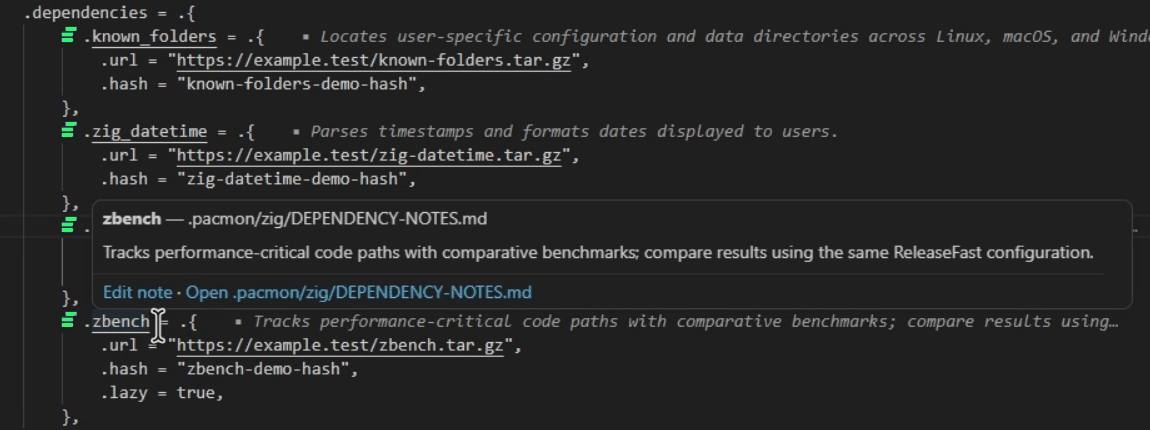
build.zig.zon in VS Code.What Depos reads
- Manifest:
build.zig.zon - Notes file:
.depos/zig/DEPENDENCY-NOTES.md - Section heading: the direct dependency field:
## known_folders
Depos reads direct fields of the top-level .dependencies struct in build.zig.zon, including URL/hash, path and lazy dependencies. build.zig, system libraries and transitive dependencies are not evaluated.
Depos never runs Zig, so it needs no Zig toolchain.
Example
.dependencies = .{
    .known_folders = .{
        .url = "git+https://github.com/ziglibs/known-folders#…",
        .hash = "…",
    },
    .zlib = .{
        .path = "deps/zlib",
    },
},
.depos/zig/DEPENDENCY-NOTES.md:
## known_folders

Finds the config and cache directories on each OS.

### Agent notes

- purpose: finds the user's config and cache directories on Linux, macOS and Windows
- constraint: change `.url` and `.hash` together, with `zig fetch --save`
- verify: `zig build test` on Linux and on Windows
The heading is the field name in .dependencies: .known_folders is ## known_folders, and an escaped name such as .@"known-folders" is ## known-folders.
Comments in build.zig.zon
.dependencies = .{
    // known_folders: config and cache directories on each OS
    .known_folders = .{
        .url = "git+https://github.com/ziglibs/known-folders#…",
        .hash = "…",
    },
},
build.zig.zon is ZON, whose grammar is a subset of Zig's: a comment starts with // and runs to the end of the line, and there are no multi-line comments.
Pinning a version
A dependency with a .url is pinned by its .hash. Zig computes the hash from the files the package includes, so a URL that starts serving different contents fails with a hash mismatch. A .path dependency has no hash: it is whatever the directory holds.
zig fetch --save=known_folders <url> fetches a package and writes its .url and .hash under that name, replacing the old pair and keeping fields such as .lazy. For a Git URL, --save records the commit the ref resolved to; --save-exact keeps the URL as given. The hash says what was fetched. Why that commit, and what has to pass before it moves, go in the dependency's note.
For AI coding agents
An agent reads a dependency's section before it adds, updates or removes it, and logs what it did under ### Agent notes. See the rules agents follow.